
Tell the story of your building with Bob.
Bring Bob a building image. Together, turn its relationship with the landscape into a story people can follow.
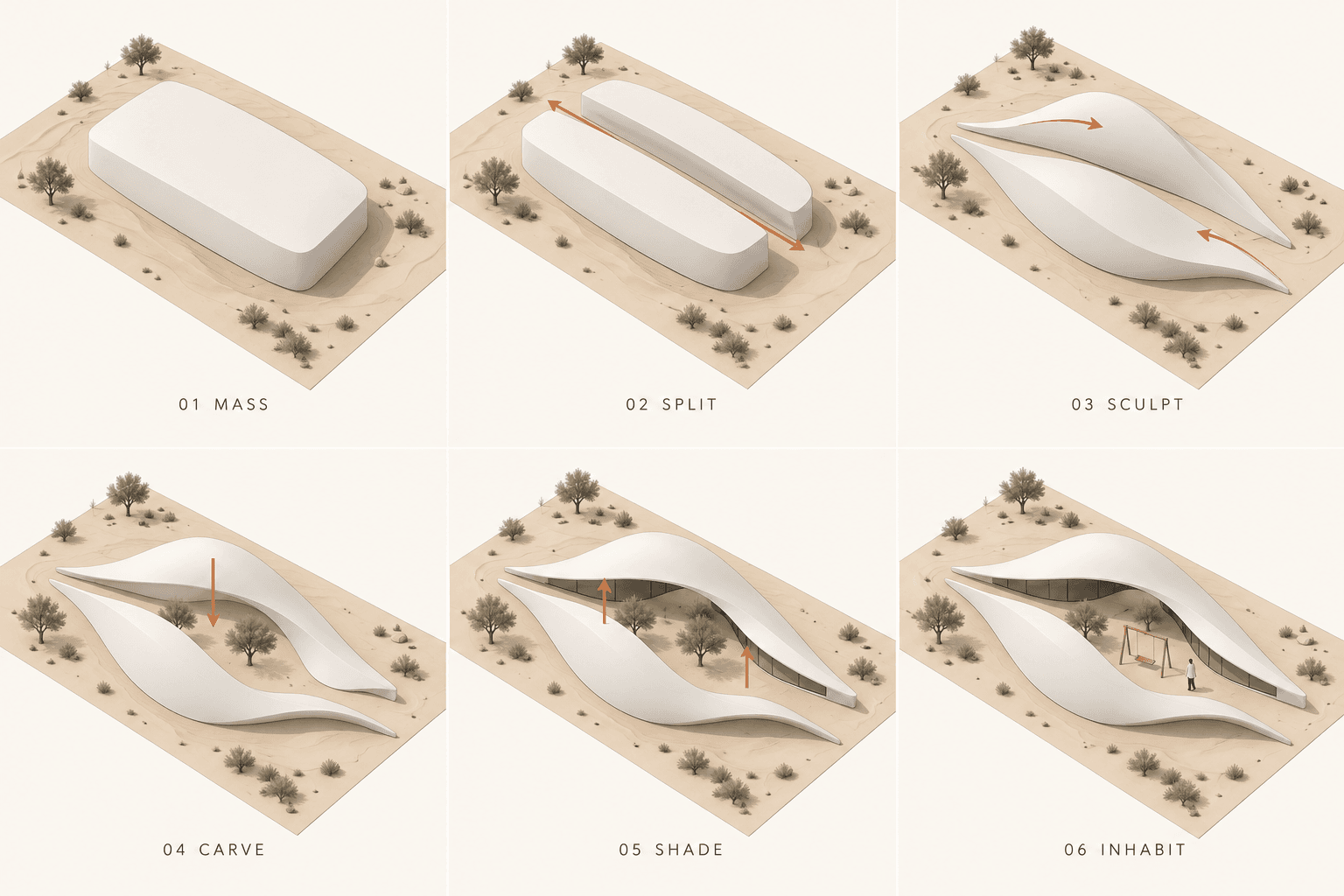
Upload your design, talk through the idea with Bob, and create architectural concept diagrams that explain why the building takes shape in its surroundings.
You have a beautiful image of your building. But when someone asks, “Why is it shaped like that?”, a render only tells part of the story.
Maybe its curves echo the dunes around it. Maybe two volumes frame a courtyard. Maybe a sweeping roof edge creates a sheltered place to pause.
Those are the ideas worth drawing.
Bob, your visualisation agent in Rendervis, can help you turn them into architectural concept diagrams. Bring him an image, explain what matters, and work through the result in conversation. You do not need to write a perfect image prompt to get started.
Borrow the storytelling from BIG
One reason architectural diagrams associated with Bjarke Ingels Group are so engaging is that they make an idea easy to follow. BIG's Yes Is More uses a comic-book narrative to explain architecture frame by frame.
You can ask Bob to use that same storytelling principle: give each drawing one clear idea, then connect the drawings into a sequence.
For this tutorial, the story is how a pavilion takes inspiration from a desert landscape. The useful questions are about form, shelter, and movement. How do the volumes echo dunes? What happens when they frame a courtyard? Where can people gather?
1. Bring your building image to Bob
Open your Rendervis workspace, upload a photo, render, or sketch of the building, and start a conversation with Bob about it. Choose an image that shows the building and enough of its surroundings to explain their relationship.
Our example is an imagined desert pavilion inspired by the interconnecting dune forms of Zaha Hadid Architects’ BEEAH Headquarters. The diagram below is a speculative concept study, not a reconstruction of that building. Its courtyard swing is an imagined addition. You can bring Bob a reference image or describe a concept you want to explore.
Tell Bob which details must stay accurate. Additional views or a plan can help when a single image leaves something unclear.
You can start as simply as this:
Bob, use this image to help me explain how the building relates to its surroundings. I want architectural concept diagrams about the design idea: the landscape, sheltered spaces, and the transition between inside and outside. Keep the building faithful to my reference. First, suggest a short story for the diagrams and tell me which relationships you can see in the image and which you are inferring.
This gives you a chance to shape the story before asking Bob to generate the sheet. If you know the original design intentions, share them. A photograph can show a sheltered courtyard; it cannot establish everything the architect intended.
2. Shape the story together
Read Bob's suggested sequence and tell him what feels right. For our desert example, a simple mass becomes two dune-like forms, which open around a courtyard and create a place to gather.
The original diagram follows six moves:
- Mass. Establish a simple starting volume in the desert setting.
- Split. Divide it into two elongated forms.
- Sculpt. Shape the volumes into sweeping dune-like shells.
- Carve. Open a courtyard between them.
- Shade. Shape the edges around sheltered entrances.
- Inhabit. Add people and an imagined courtyard swing to suggest everyday life.
Use those moves to explain the relationship with the landscape. Ask Bob to connect each change to an idea, so the sequence tells more than the order in which shapes appear.
Bob, make the desert landscape the starting point. Explain how the dune-like forms, courtyard, and sheltered edges help this imagined pavilion belong there. Keep each panel focused on one idea. Use arrows to explain the changes and connections.
3. Ask Bob to create the diagram sheet
Once the story feels right, ask Bob to generate it. He can turn your brief and reference into an image-generation request; you can stay focused on what the drawings need to communicate.
Here is a copyable prompt for the pavilion example. Attach your own building image and adapt the sequence for your project:
Bob, create a six-panel architectural concept diagram sheet for an imagined desert pavilion inspired by the interconnecting dune forms of Zaha Hadid Architects’ BEEAH Headquarters. Treat this as a speculative teaching exercise, not a reconstruction or an official drawing.
Tell the story in six frames: a simple starting mass; two elongated volumes; sculpted dune-like shells; a courtyard carved between them; sheltered entrances beneath the shell edges; and the inhabited pavilion. Include a small freestanding swing in the courtyard as an imagined addition. Explain how the form responds to the desert setting and creates a sheltered place to gather.
Use a three-column, two-row layout with one consistent elevated axonometric viewpoint, site footprint, and scale. Keep the two volumes consistent as they evolve. Use white clay forms, fine dark outlines, a muted sand-colored site, soft shadows, and restrained terracotta arrows. Keep the landscape minimal and leave generous white space. Label the frames: MASS, SPLIT, SCULPT, CARVE, SHADE, INHABIT.
Make the arrows explain the design moves. Keep environmental claims conceptual; do not imply that the sheet proves solar, wind, or thermal performance.
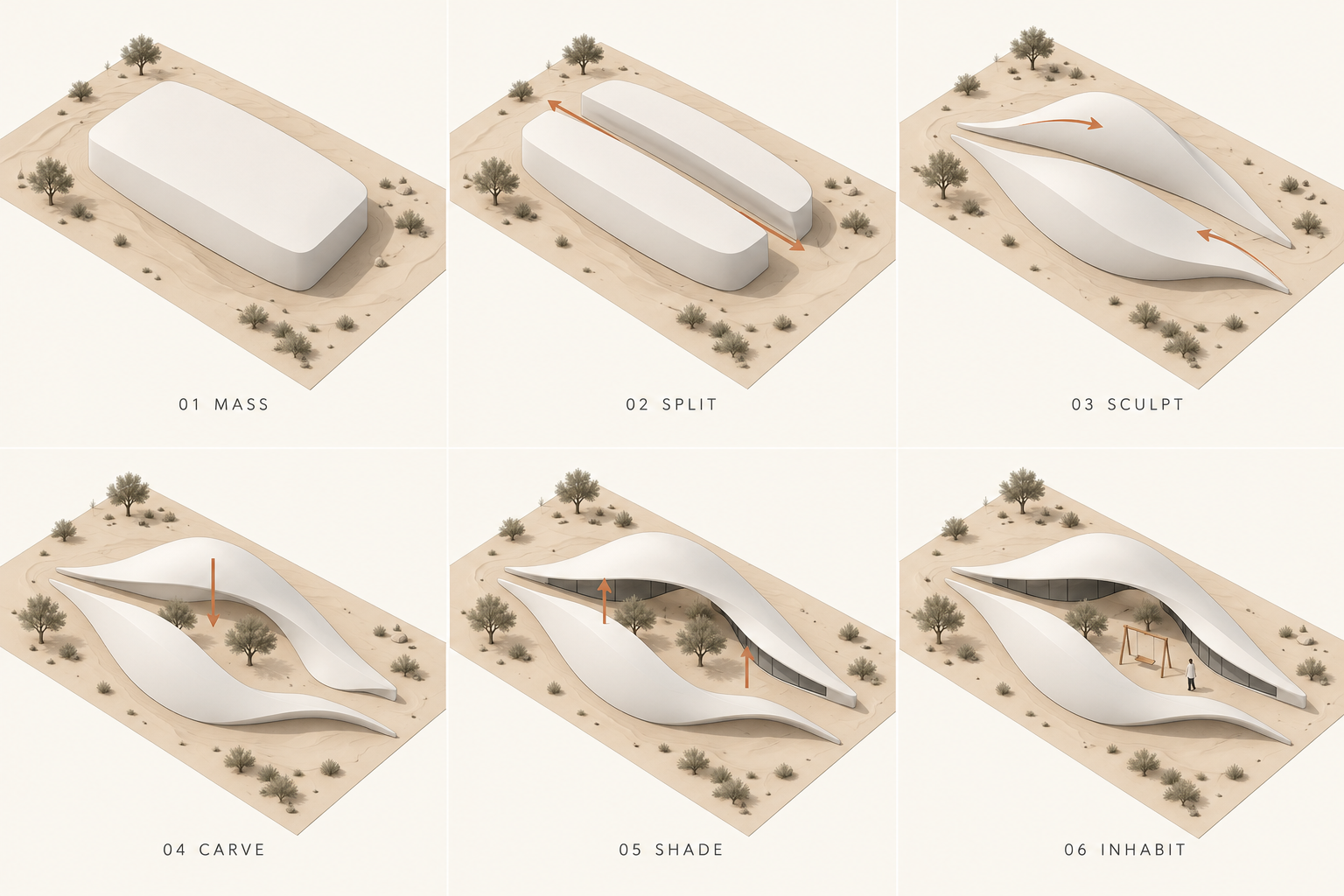
Original AI-generated dune concept sheet. Inspired by BEEAH Headquarters; the sequence and courtyard swing are imagined for this tutorial, not documented features or an official design process.
Notice how the sequence moves from a simple volume to a place people can use. The courtyard gives the sculptural forms a spatial purpose, and the final frame suggests what spending time there might feel like.
4. Refine the result with Bob
The first sheet is a draft. Compare it with your reference and tell Bob exactly what needs to change. You do not need to start a new conversation or rewrite the whole brief.
If the architecture has drifted
Bob, compare this sheet with my original image. The two dune-like volumes, central courtyard, and sweeping roof edges need to match more closely. Correct those features across every panel. Keep the environmental story and graphic style.
Naming the wrong feature helps more than saying “make it more accurate.” If you can, point to the part of the reference you mean.
If it starts explaining construction
Bob, revise the sequence around how the building responds to its surroundings. Explain landscape, views, shelter, and movement. Replace any assembly steps with those design relationships. Use arrows to show why the spaces work together.
If the viewpoint hides the idea
Bob, choose a slightly higher three-quarter view so the two volumes, courtyard, and sheltered entrances are easier to understand. Preserve the building proportions and use the same viewpoint in every panel.
If there is too much going on
Bob, simplify the sheet. Keep one main relationship and one clear arrow system per panel. Reduce background detail, shorten the captions, and keep only the people needed to explain scale and use.
Work through the important corrections first: the building, the story, then the graphic details. AI images can still drift, so check each revision against the reference rather than assuming every feature is preserved.
5. Check that the story holds together
Before sharing the sheet, follow it from the first frame to the last. Does each panel explain something different? Can you tell what each arrow means? Does the building remain the same building throughout?
You can ask Bob to help with that review:
Bob, review this sheet against my original image and our agreed story. Point out inconsistent geometry, unclear arrows, repeated ideas, or claims the reference cannot support. Then revise the sheet to address those issues.
Keep your own design knowledge in the conversation. Illustrative sun rays can explain shelter, but checking actual solar performance takes site information and analysis. Likewise, a single photo may leave parts of the building uncertain. Give Bob a plan or another view when that detail matters.
Try it with your own project
You can begin with a rough sketch and a sentence about what you want the building to do for its surroundings.
Bring it to Bob and say, “Help me tell the story of this building.” Talk through the ideas, ask him to create the diagrams, and refine them together until the relationships are clear.
The result should help someone look at your design and understand why it belongs where it is.
Your next idea starts with Bob.
Bring a sketch, a photo, or a model. Tell Bob what you have in mind, and see where it takes you.
Try 5 free renders